I posted this at Facebook (remember when Facebook had a character limit for status updates? That so didn't work for me). And then thought I might as well post it here as well.
I wrote a long review of MOSS Robotics back in July.
Here's the Wall Street Journal Article, Tech Toys to Make Children Smarter, which is a terrible title.
And here are my comments on it:
The Wall Street Journal reviews Kano, MOSS Robotics, and Little Bits. Because of the kind of person I am, we have all three of these things.
I'd add, or emphasize, that Kano is beautifully designed, and putting it together and following the on-screen animations to set it up is amazing. Once it's together, though, it's got a processor that is slower than anything the children of the 21st century have ever encountered before, leading to multiple instances of us sitting around wondering if it's crashed while waiting for it to load a webpage or finish a process. The Tiny Tornado loved the idea of having his own computer, but switches to a device with a faster processor whenever he has the chance, and now hasn't fired up his Kano for awhile. I suspect the market for Kano is families like ours, that have access to other computers and buy this low-cost computer kit to enhance their kids' experience, which makes me think TT's story isn't unique. If you had a kid very committed to programming already, Kano might work great for them. But there are a lot of programming resources that are awesome, cheaper or free, and run on a tablet or the computer you've already got.
The kids in the review had the same problem we had with MOSS Robotics: the instructions are very difficult to follow, and the robots fall apart. All the time. Over and over and over again.
Finally, when they tried Little Bits, they got to a problem I think is pretty well ubiquitous with these kinds of toys and gadgets: to really unlock the power, users need to start thinking independently, trying their own ideas, using them not as a kit with instructions to be followed but as a tool for making their own creations. But not everybody's minds work like that, and a lot of kids need plenty of guidance to make the change. As much as these things market themselves as easy-to-use, they really have a heck of a learning curve.
Showing posts with label reviews. Show all posts
Showing posts with label reviews. Show all posts
Wednesday, December 17, 2014


Wednesday, July 16, 2014
I Am Disappointed: MOSS Robotics Building Set
I have been keeping a covetous eye on ModRobotics for a couple of years, ever since I saw a demo video for Cubelets, their first-generation snap-together modular robot building system. Each little cube has a specific function, and they easily snap together using embedded magnets. Without having to do any programming, builders can make motorized robots that respond to inputs like sound, light, and proximity.


I could easily imagine the kids and me having enormous fun messing around with these; for simple robots, I thought, they'd be easier to work with than Lego Mindstorms, which require programming and cables and building with complicated connectors. Cubelets is cubes; Mindstorms is various sensors and motors, a collection of cables, and dozens of different building pieces.

I didn't expect Cubelets to be as versatile and powerful as Mindstorms, but I did expect it to be relatively easy to use, and to provide quicker gratification.
Well, I never got any Cubelets. They're produced in relatively small quantities, and availability never coincided with me having the funds to buy them.
But that was OK, because ModRobotics has moved on to Generation 2: MOSS.
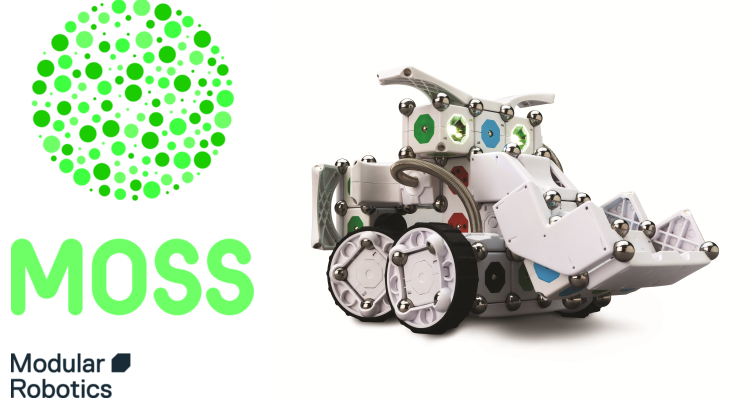
Like Cubelets, MOSS has an underlying cube structure, but includes other pieces as well that make it more versatile, like this pivot:

And this flexible piece that allows information to flow between non-adjacent blocks:

In addition, MOSS robots can be controlled by apps that work on smartphones and tablets, and they are or will be programmable using Scratch and other programming languages.
I pre-ordered a set some months ago, and, after the usual production delays, received it a week or so ago. We dived into it with excitement, but we have met with frustration and disappointment.
First, these cubes are held together with small steel balls that snap into magnets embedded in the blocks' corners. The kit comes with a gazillion of these little balls; this picture represents only a fraction of ours, since the rest are currently in use on robots:
These steel balls snap into place in a very satisfying way. However, they are small and slippery, and robotics building at our house has been regularly punctuated by the sound of them hitting the wood floor and rolling under things. They also come unstuck too easily; they protrude beyond the edges of the robot, and we have found ourselves accidentally brushing them loose when handling our robots.
The steel balls, though, are not the biggest problem with MOSS. In retrospect it's obvious, but somehow it hadn't occurred to me that when you build a structure completely out of interlocking cubes, you create a three-dimentional grid of cleavage lines along which it can easily break. We have found it difficult to keep our robots together even until we're done building them. They need to be handled like small animals: picked up very carefully with both hands, and supported from underneath. Any time you forget to do that, something comes loose. I was going to show you our most successful robot, but I carelessly picked it up with one hand—I tried to support it from underneath, honest!—and this is what happened:
This was a cute little four-wheeled robot that could be driven around by remote control using the iOS app. But one careless moment, and it's junk.
As it was, our most successful robot was a scaled-down version of this robot from the "getting started" guide:
We never could get that apparatus on the front, a flashlight and proximity sensor on a pivot arm, to do anything but fall off. The kit includes several types of braces for reinforcement, including this brace as long as three blocks:

We haven't found the braces especially useful at preventing Robot Collapse, and we weren't able to keep that pivot arm on our robot even when we added additional bracing. (Comment from the Lego Savant: "When you say we, I don't know...I was able to get that arm on pretty well. I could never get it to work, but I did manage to keep it on for awhile at least. I think if you're careful to build it exactly right, it works pretty well.")
Our little remote-control robot also shed parts any time it bumped into something. If you've ever driven a remote-control vehicle, you know they bump into things a lot. The Lego Savant and I have built Mindstorms robots that could hang from a rope or be dropped from surprising heights (oops!) without falling to pieces. Tougher to build, sure. But tougher in general.
These frustrations are significant enough that I feel almost petty mentioning that the documentation is poor. It's easier for the Lego Savant, but I find it difficult to make sense of many of the diagrams. But we can't be too hard on ModRobotics for that; after a decade of Lego, nobody's diagrams measure up.
It's a bigger problem that I find it almost impossible to tell the difference between blocks. Here, for instance, are the pictures used for the microphone sensor:

And the proximity sensor:

The actual blocks are not much easier to tell apart. Here are the flashlight and the light sensor:
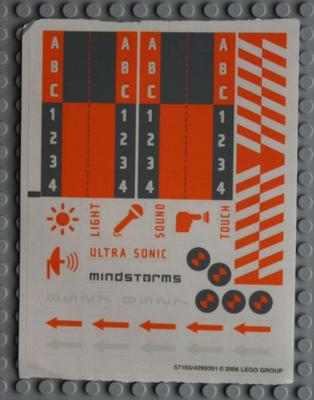
I, for one, could have used some labels. A little sheet of stickers, say, like the ones that come with Mindstorms:
We're persistent, and haven't given up on MOSS yet. But I had hoped that this would be a snap-and-go robotics toy for my kids, or something I could put out on a table at my homeschool group for kids to easily experiment with. Those hopes are pretty well dashed.
I still love the underlying concept, and I hope the ModRobotics team, or someone else, can keep working toward a robotics kit that's easier to dive into than Mindstorms. In the meantime, we still love Mindstorms. I paid almost four hundred bucks for this extensive kit of MOSS modules. I could have upgraded the Lego Savant to Mindstorms EV3 for $350, and taken him out for a nice dinner with the leftovers, and it's feeling like that would probably have been a better investment.
We may yet fall in love with MOSS, figuring out how to get our robots to hold together, or finding the sweet spot of things that MOSS is especially good for. But even if we do, a product that has "easy to use" as one of its main selling points should not have this kind of learning curve.
The Lego Savant says, "Yeah, I don't have anything to add except the arm thing. This is a pretty good review. I do plan to keep experimenting with it."
We'll update after we've played more, and let you know how things work out.
Monday, July 14, 2014
CLEVER: The Card Game, A Review
I have something of a hobby backing things on Kickstarter and Indiegogo. It's fun: you find something that you'd like to see exist, and pledge some money toward helping to create it. Then you wait. While you're waiting, the creators keep you posted on their progress. You get to hear about them checking out prototypes, visiting factories, making revisions. And when their project goes into production, you get to celebrate with them and possibly be one of the first people ever to get one. If their product never goes into production beyond the initial Kickstarter run, this may be your only chance to own something interesting and rare.
The first project I supported at Kickstarter, back in 2012, was a base for Mindstorms robotics that has different holes that are compatible with the various Mindstorms connectors. It has proven to be very useful when building small mechanisms that are meant to stay in place. The Lego Savant and I recently used it when building a simple belt driver to turn his Leonard da Vinci helicopter model. You can see the gray Minutebot base holding the Mindstorms brick in place:


The first project I supported at Kickstarter, back in 2012, was a base for Mindstorms robotics that has different holes that are compatible with the various Mindstorms connectors. It has proven to be very useful when building small mechanisms that are meant to stay in place. The Lego Savant and I recently used it when building a simple belt driver to turn his Leonard da Vinci helicopter model. You can see the gray Minutebot base holding the Mindstorms brick in place:
Our most recent Kickstarter arrival is a card game called CLEVER. More accurately, it's a unique deck of 74 cards that can be used to play a number of games.
The packaging and cards are high-quality and nicely designed. Here is the box for the game:
And this is what it looks like when you open it:
The instruction booklet was on top, and under it is the deck itself, in a card box tucked into the center of a frame that lists people who contributed $50 or more.
Here is a not very exciting picture of the card box itself:
It's perfectly nice, but probably the least impressive bit of design associated with this project. I pledged enough to get two copies of the game, one for us and one to give away, and the card box for our copy had come unglued in transit. The gift copy was fine, though.
Here are some sample cards:
These are just lovely, and they're a very high-quality plastic that I expect to hold up well. These cards have a lot going on. Each one has a number or letter; each of the digits from 0-9 and each of the letters of the alphabet appears twice. Each card is also associated with a color. There are twelve colors in all, and we really appreciate that the names of the colors are printed on the cards. Not only have we found the blue to be a bit purply and the tan to be a bit on the brownish-green side, but I have two kids who are color blind. There are games we've struggled to play because the kids can't distinguish between similar colors. It's helpful to be able to read the color names.
In addition, each card belongs to one of twelve categories: balls, birds, body parts, electric appliances, fruit, and so on. Here's the key that appears in the instruction booklet:
Cards can be grouped by any of their various relationships. You might have three blue things, or three vegetables, for instance. In addition, you can group letter cards by alphabetical sequence (MNO) or by spelling words like CAT or DRY. Number cards can be grouped by sequence or by forming simple equations, for instance with a 5, a 2, and a 7. In some games, it's also possible to match a pair of cards that have the same number or letter.
My older two and I have already spent some time playing a game called called Three, which starts with three cards face-up on the table. These cards are random, and they may not be related at all, or two of them may be related in some way, or all three. Players take turns adding a single card to one of the three stacks, preserving the number of related cards. If you started with two related cards, you only need to play a card that relates to at least one other. But if you started with three, you have to play a card that keeps all three cards related.
We quickly modified the rules of this game so that if the original three cards weren't related at all, three new random cards were played on top of them. We found that preserving "zero or more" related cards removed any challenge from the game, and it quickly became tedious.
We want to try some variations on Three. For instance, it might be fun to try "maintain exactly the same number of cards in relationship" rather than "the same number or more." It might be a fun challenge to have to play cards that preserve the lack of relationships if you start at zero. We have several ideas.
We are also interested in thinking about creating a game where you build a collection of as many related cards as possible.
Today, my almost-seven year old and I played a game that required matching only two cards at a time. He grasped the concept very quickly, but argued about some of the categories. Hummingbirds and dragonflies are both small flying things, for example, so why can't they make a pair? And why can't a fan and a van be a pair, because they rhyme? We stuck to the rule book today, but I expect we'll try playing with looser rules sometime and see what happens.
CLEVER reminds me of SET, another game in which there are multiple ways that cards can relate to each other. We love SET, but CLEVER feels more like the kind of card deck it would be handy to keep in the bottom of your parent-bag to pull out whenever there are kids to be entertained. Very simple matching games could be set up for young children, whereas rummy-style games and more complex puzzle games can be played with older kids and adults.
My three kids, who are 13, 10, and 7, all give the game high marks. And so do I. It's very well-designed both conceptually and graphically, we've already had a lot of fun with it, and it complicates the traditional card deck in ways that we find both fun and challenging.
Thursday, March 31, 2011
Lego WeDo Review: Now that we've been using it awhile
Carl, who was 6 at the time, got Lego WeDo for Christmas, and after our first experiments with it, I was very enthusiastic. Now that we've been using it for awhile, I have some reservations about it I'd like to mention.
Building the robots is still very fun, and the programming interface is bright and easy for Carl to use. The information is well-organized and very clear, for both me and him. But we have some consistent problems with our robots. I mentioned in my first review that WeDo uses standard Lego bricks for construction, rather than the girder-and-connector building style used in Lego Mindstorms robotics and Lego Technics. The top image at this page is of a Mindstorms robot that shows the girder building components. If you scroll down to the bottom of this page, you can see some images of WeDo robots for comparison.
The WeDo robots are very easy for Carl to build, and they look cute. The problem is that the standard Lego bricks just don't hold onto each other the way Mindstorms NXT girders do. So, under stress, they come apart. Our boat-on-a-stormy-sea WeDo robot, for instance, regularly beat itself to pieces. This is very frustrating for Carl.
Another problem we've bumped into is that many of the robots can really only do a single thing. We were spoiled when Carl chose the Dancing Birds robot as his first project; once you've built it, you can program the birds to spin in the same or opposite directions, at different speeds, for differing durations, and with different sounds. They can be made to speed up and slow down. Carl played around with programming his Dancing Birds robot for a long time over several days.
Alas, some of the other projects are less playable. One reason the boat kept beating itself to pieces was that it couldn't tolerate the speed of the motor being adjusted any higher than in the sample program; the other is that the Lego studs just weren't strong enough to hold the boat's stand to the baseplate when there was repetitive movement.
Today we built a giant that stands up and roars; once we built it and copied the sample program, we couldn't figure out anything else to do with it, except run the motor in reverse so it sat down again. You had to run the motor for a very specific amount of time or the giant either didn't stand all the way up or was flipped over by the lever controlling it. The rubber band connecting the motor pulley to the lever pulley came loose about half the time. We watched the giant stand up once; Carl experimented and found 12 different ways for the thing to go wrong; and 10 minutes later, he was done. His verdict? "Well, that was boring."
So, what do I think overall? There are still some good qualities to the program. The robots are designed to demonstrate the use of certain mechanics; for instance, our standing-up giant was raised by a lever that was driven by a worm gear. The software points out these things, and Carl finds them interesting. But if mechanics is the point, then perhaps some kits that introduce simple machines, either from Lego or elsewhere, would be more cost-effective. I know that a big part of what is most fun for Carl is experimenting with programming the robot to do different things; if too many of the robots are single-action, that's too many days he's walking away from the computer with the word "boring" on his lips. We still have a lot of robots to try out, so much will depend on the ratio of good ones to duds.
Lego says the WeDo kit is for kids 7 and up; Carl just turned seven last week, so he's at the young end of the range for it, and yet one of my thoughts is that this might be better for younger kids. Or maybe for 7-year-olds who haven't been fellow travelers for their older brothers' Mindstorms robots already.
My buying advice? If $180 isn't a lot of money for you and you have a 5, 6, or 7 year old who is really into robotics but not ready for Mindstorms, go for it. There is some fun to be had here, and some basics to learn. Otherwise, wait a couple of years until your kid can accompany you on some Mindstorms adventures; Mindstorms has been a much better investment.
Building the robots is still very fun, and the programming interface is bright and easy for Carl to use. The information is well-organized and very clear, for both me and him. But we have some consistent problems with our robots. I mentioned in my first review that WeDo uses standard Lego bricks for construction, rather than the girder-and-connector building style used in Lego Mindstorms robotics and Lego Technics. The top image at this page is of a Mindstorms robot that shows the girder building components. If you scroll down to the bottom of this page, you can see some images of WeDo robots for comparison.
The WeDo robots are very easy for Carl to build, and they look cute. The problem is that the standard Lego bricks just don't hold onto each other the way Mindstorms NXT girders do. So, under stress, they come apart. Our boat-on-a-stormy-sea WeDo robot, for instance, regularly beat itself to pieces. This is very frustrating for Carl.
Another problem we've bumped into is that many of the robots can really only do a single thing. We were spoiled when Carl chose the Dancing Birds robot as his first project; once you've built it, you can program the birds to spin in the same or opposite directions, at different speeds, for differing durations, and with different sounds. They can be made to speed up and slow down. Carl played around with programming his Dancing Birds robot for a long time over several days.
Alas, some of the other projects are less playable. One reason the boat kept beating itself to pieces was that it couldn't tolerate the speed of the motor being adjusted any higher than in the sample program; the other is that the Lego studs just weren't strong enough to hold the boat's stand to the baseplate when there was repetitive movement.
Today we built a giant that stands up and roars; once we built it and copied the sample program, we couldn't figure out anything else to do with it, except run the motor in reverse so it sat down again. You had to run the motor for a very specific amount of time or the giant either didn't stand all the way up or was flipped over by the lever controlling it. The rubber band connecting the motor pulley to the lever pulley came loose about half the time. We watched the giant stand up once; Carl experimented and found 12 different ways for the thing to go wrong; and 10 minutes later, he was done. His verdict? "Well, that was boring."
So, what do I think overall? There are still some good qualities to the program. The robots are designed to demonstrate the use of certain mechanics; for instance, our standing-up giant was raised by a lever that was driven by a worm gear. The software points out these things, and Carl finds them interesting. But if mechanics is the point, then perhaps some kits that introduce simple machines, either from Lego or elsewhere, would be more cost-effective. I know that a big part of what is most fun for Carl is experimenting with programming the robot to do different things; if too many of the robots are single-action, that's too many days he's walking away from the computer with the word "boring" on his lips. We still have a lot of robots to try out, so much will depend on the ratio of good ones to duds.
Lego says the WeDo kit is for kids 7 and up; Carl just turned seven last week, so he's at the young end of the range for it, and yet one of my thoughts is that this might be better for younger kids. Or maybe for 7-year-olds who haven't been fellow travelers for their older brothers' Mindstorms robots already.
My buying advice? If $180 isn't a lot of money for you and you have a 5, 6, or 7 year old who is really into robotics but not ready for Mindstorms, go for it. There is some fun to be had here, and some basics to learn. Otherwise, wait a couple of years until your kid can accompany you on some Mindstorms adventures; Mindstorms has been a much better investment.
Sunday, May 16, 2010
TV Needs More People Like Hurley
David and I have just started watching Lost, from the beginning, on DVD from the library. I like it fine. But what I like best about it is Hurley, the fat guy. Why?
Because Hurley is a smart guy. He is not portrayed as a glutton--in fact, when another character assumes he has been hoarding food and comes to him to ask for some, Hurley takes him down a peg with a kind of tired dignity that shows he's dealt with this kind of bs before and he's just not gonna get worked up about it anymore. When there's work to be done (digging somebody out of a collapsed cave, hauling heavy shit around) Hurley gets in there and does it.
He's portrayed as a decent guy who treats others well. He's the one who figures out that the stranded people need something more to bring them together than the endless round of survival and try-to-get-rescued activities.
The show treats Hurley respectfully even when others don't--when another character calls him "Lardo," it's just his selected insult for Hurley; he has a different one for anybody else who crosses his path.
Hurley is a fat guy who never once says anything denigrating about himself; when he tells Charlie he's taken in a notch on his belt, it's a statement of fact, not a "one good thing about being stranded on an island and not being able to get Ben & Jerry's, ha ha" joke of the kind we hear all too often from women with, say, a stomach bug.
I've heard Hurley called the show's comic relief. And he is. But unlike most fat characters on TV, he's not the comic relief because the show is making fun of him, or he is making fun of himself. He's the comic relief because he has a sense of humor.
This shouldn't be revolutionary. There are plenty of fat people in the world who are healthy and hard-working; who like themselves despite all the messages they get telling them they shouldn't; who have brains and compassion and decent relationships. But they don't show up on TV or in the movies. On TV, they show up on The Biggest Loser, or on NCIS as a woman whose flirtation with a main character can't be anything but a joke, or on name-your-medical-drama as patients who are psychotic or eating themselves to death.
I am happy to add Lost to my very short list of movies and TV shows with positive portrayals of fat people (even if the show otherwise makes no effort to show the diversity of body size and shapes that 40 people randomly put together on a plane would exhibit). We're maybe nine episodes in, and so far Hurley and the show's treatment of him is the highlight for me. It is so refreshing to see a member of my tribe being treated like a human being on TV.