Showing posts with label mindstorms. Show all posts

Wednesday, July 16, 2014

I Am Disappointed: MOSS Robotics Building Set

I have been keeping a covetous eye on ModRobotics for a couple of years, ever since I saw a demo video for Cubelets, their first-generation snap-together modular robot building system. Each little cube has a specific function, and they easily snap together using embedded magnets. Without having to do any programming, builders can make motorized robots that respond to inputs like sound, light, and proximity.


I could easily imagine the kids and me having enormous fun messing around with these; for simple robots, I thought, they'd be easier to work with than Lego Mindstorms, which require programming and cables and building with complicated connectors. Cubelets is cubes; Mindstorms is various sensors and motors, a collection of cables, and dozens of different building pieces.


I didn't expect Cubelets to be as versatile and powerful as Mindstorms, but I did expect it to be relatively easy to use, and to provide quicker gratification.

Well, I never got any Cubelets. They're produced in relatively small quantities, and availability never coincided with me having the funds to buy them.

But that was OK, because ModRobotics has moved on to Generation 2: MOSS


Like Cubelets, MOSS has an underlying cube structure, but includes other pieces as well that make it more versatile, like this pivot:

And this flexible piece that allows information to flow between non-adjacent blocks:

In addition, MOSS robots can be controlled by apps that work on smartphones and tablets, and they are or will be programmable using Scratch and other programming languages.

I pre-ordered a set some months ago, and, after the usual production delays, received it a week or so ago. We dived into it with excitement, but we have met with frustration and disappointment.

First, these cubes are held together with small steel balls that snap into magnets embedded in the blocks' corners. The kit comes with a gazillion of these little balls; this picture represents only a fraction of ours, since the rest are currently in use on robots:


These steel balls snap into place in a very satisfying way. However, they are small and slippery, and robotics building at our house has been regularly punctuated by the sound of them hitting the wood floor and rolling under things. They also come unstuck too easily; they protrude beyond the edges of the robot, and we have found ourselves accidentally brushing them loose when handling our robots.

The steel balls, though, are not the biggest problem with MOSS. In retrospect it's obvious, but somehow it hadn't occurred to me that when you build a structure completely out of interlocking cubes, you create a three-dimentional grid of cleavage lines along which it can easily break. We have found it difficult to keep our robots together even until we're done building them. They need to be handled like small animals: picked up very carefully with both hands, and supported from underneath. Any time you forget to do that, something comes loose. I was going to show you our most successful robot, but I carelessly picked it up with one hand—I tried to support it from underneath, honest!—and this is what happened:


This was a cute little four-wheeled robot that could be driven around by remote control using the iOS app. But one careless moment, and it's junk.

As it was, our most successful robot was a scaled-down version of this robot from the "getting started" guide:


We never could get that apparatus on the front, a flashlight and proximity sensor on a pivot arm, to do anything but fall off. The kit includes several types of braces for reinforcement, including this brace as long as three blocks:

We haven't found the braces especially useful at preventing Robot Collapse, and we weren't able to keep that pivot arm on our robot even when we added additional bracing. (Comment from the Lego Savant: "When you say we, I don't know...I was able to get that arm on pretty well. I could never get it to work, but I did manage to keep it on for awhile at least. I think if you're careful to build it exactly right, it works pretty well.")

Our little remote-control robot also shed parts any time it bumped into something. If you've ever driven a remote-control vehicle, you know they bump into things a lot. The Lego Savant and I have built Mindstorms robots that could hang from a rope or be dropped from surprising heights (oops!) without falling to pieces. Tougher to build, sure. But tougher in general.

These frustrations are significant enough that I feel almost petty mentioning that the documentation is poor. It's easier for the Lego Savant, but I find it difficult to make sense of many of the diagrams. But we can't be too hard on ModRobotics for that; after a decade of Lego, nobody's diagrams measure up.

It's a bigger problem that I find it almost impossible to tell the difference between blocks. Here, for instance, are the pictures used for the microphone sensor:

And the proximity sensor:


The actual blocks are not much easier to tell apart. Here are the flashlight and the light sensor:


I, for one, could have used some labels. A little sheet of stickers, say, like the ones that come with Mindstorms:
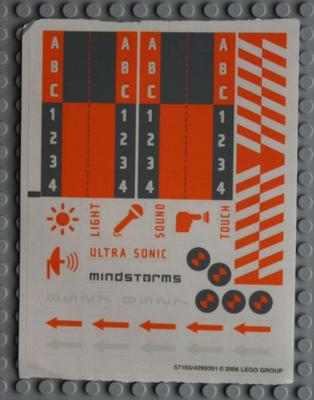


We're persistent, and haven't given up on MOSS yet. But I had hoped that this would be a snap-and-go robotics toy for my kids, or something I could put out on a table at my homeschool group for kids to easily experiment with. Those hopes are pretty well dashed.

I still love the underlying concept, and I hope the ModRobotics team, or someone else, can keep working toward a robotics kit that's easier to dive into than Mindstorms. In the meantime, we still love Mindstorms. I paid almost four hundred bucks for this extensive kit of MOSS modules. I could have upgraded the Lego Savant to Mindstorms EV3 for $350, and taken him out for a nice dinner with the leftovers, and it's feeling like that would probably have been a better investment.

We may yet fall in love with MOSS, figuring out how to get our robots to hold together, or finding the sweet spot of things that MOSS is especially good for. But even if we do, a product that has "easy to use" as one of its main selling points should not have this kind of learning curve.

The Lego Savant says, "Yeah, I don't have anything to add except the arm thing. This is a pretty good review. I do plan to keep experimenting with it."

We'll update after we've played more, and let you know how things work out.

Thursday, March 31, 2011

Lego WeDo Review: Now that we've been using it awhile

Carl, who was 6 at the time, got Lego WeDo for Christmas, and after our first experiments with it, I was very enthusiastic. Now that we've been using it for awhile, I have some reservations about it I'd like to mention.

Building the robots is still very fun, and the programming interface is bright and easy for Carl to use. The information is well-organized and very clear, for both me and him. But we have some consistent problems with our robots. I mentioned in my first review that WeDo uses standard Lego bricks for construction, rather than the girder-and-connector building style used in Lego Mindstorms robotics and Lego Technics. The top image at this page is of a Mindstorms robot that shows the girder building components. If you scroll down to the bottom of this page, you can see some images of WeDo robots for comparison.

The WeDo robots are very easy for Carl to build, and they look cute. The problem is that the standard Lego bricks just don't hold onto each other the way Mindstorms NXT girders do. So, under stress, they come apart. Our boat-on-a-stormy-sea WeDo robot, for instance, regularly beat itself to pieces. This is very frustrating for Carl.

Another problem we've bumped into is that many of the robots can really only do a single thing. We were spoiled when Carl chose the Dancing Birds robot as his first project; once you've built it, you can program the birds to spin in the same or opposite directions, at different speeds, for differing durations, and with different sounds. They can be made to speed up and slow down. Carl played around with programming his Dancing Birds robot for a long time over several days.

Alas, some of the other projects are less playable. One reason the boat kept beating itself to pieces was that it couldn't tolerate the speed of the motor being adjusted any higher than in the sample program; the other is that the Lego studs just weren't strong enough to hold the boat's stand to the baseplate when there was repetitive movement.

Today we built a giant that stands up and roars; once we built it and copied the sample program, we couldn't figure out anything else to do with it, except run the motor in reverse so it sat down again. You had to run the motor for a very specific amount of time or the giant either didn't stand all the way up or was flipped over by the lever controlling it. The rubber band connecting the motor pulley to the lever pulley came loose about half the time. We watched the giant stand up once; Carl experimented and found 12 different ways for the thing to go wrong; and 10 minutes later, he was done. His verdict? "Well, that was boring."

So, what do I think overall? There are still some good qualities to the program. The robots are designed to demonstrate the use of certain mechanics; for instance, our standing-up giant was raised by a lever that was driven by a worm gear. The software points out these things, and Carl finds them interesting. But if mechanics is the point, then perhaps some kits that introduce simple machines, either from Lego or elsewhere, would be more cost-effective. I know that a big part of what is most fun for Carl is experimenting with programming the robot to do different things; if too many of the robots are single-action, that's too many days he's walking away from the computer with the word "boring" on his lips. We still have a lot of robots to try out, so much will depend on the ratio of good ones to duds.

Lego says the WeDo kit is for kids 7 and up; Carl just turned seven last week, so he's at the young end of the range for it, and yet one of my thoughts is that this might be better for younger kids. Or maybe for 7-year-olds who haven't been fellow travelers for their older brothers' Mindstorms robots already.

My buying advice? If $180 isn't a lot of money for you and you have a 5, 6, or 7 year old who is really into robotics but not ready for Mindstorms, go for it. There is some fun to be had here, and some basics to learn. Otherwise, wait a couple of years until your kid can accompany you on some Mindstorms adventures; Mindstorms has been a much better investment.

Thursday, January 20, 2011

Premature Curriculum Review: Lego Mindstorms NXT Mayan Adventure

One of the challenges for homeschooling parents trying to evaluate curriculum is that, whether at websites like homeschoolreviews.com or on people's own blogs, there is a tendency for moms to post reviews during the first few glowing days. So there are a lot of reviews that start, "I just got this in the mail and it looks great!" or, "We've been using this for two weeks and my kids love it!" It makes sense; everybody's enthusiasm is highest when things are new. But it's not all that helpful in terms of knowing how it really worked out. It's a nice treat when someone comes back a few months later to update their review, or someone who used a curriculum over a full year, or more, writes a detailed review.

I have resolved, myself, to try not to write about curriculum until we've really given it a shot.

And I am breaking that resolution now. Sorry.

One of Eric's Christmas presents was the Lego Mindstorms NXT: The Mayan Adventure homeschool pack, which includes the book and some extra parts you will need for some of the challenges. We haven't started it yet, but I read through it the other day and am--yes--very excited about it. We're going to work on it this afternoon, and I will certainly try to post more as we get into it.

The book sets up five robotics challenges in the context of a story about a boy with an NXT kit who goes on an archaeology expedition with his uncle. They find themselves at a pyramid that has, as one of its security features, tiny tunnels leading to hidden switches and doorways, designed to be navigated by trained spider monkeys. The team has no spider monkeys. But they do have an NXT kit! So the robots need to be designed to do the spider monkeys' jobs. For instance, the first challenge is to build and program a robot that can travel ten feet down an 10-foot tunnel, turn 90 degrees, travel 8 feet, turn 90 degrees again, travel 3 feet and press a switchplate, and then turn around and come back out again.

Each challenge is set up over four chapters: one that tells the story of the boy; one that I really like that uses a planning and design worksheet to think through the specific tasks the robot has to do and how they might be done, and what constraints exist (for instance, this first robot has to be pretty narrow to get around the corners, and it has to be able to turn, which means using two motors); and then one about building the robot, and one about programming and de-bugging it. I like that the chapters on building and programming present various options, like using either the optical sensor or the pressure sensor to tell the robot when it's reached a corner, and model a trial-and-error approach. For instance, the author writes that it took four tries for him to get his robot right, and he describes what he did for each try, what went wrong, and what he tried to fix it.

I don't know how much patience Eric will have with the design process part; he likes to jump into things. But I like the way the book is organized. We're going to take our first shot at it this afternoon; I'll let you know how it goes. If I can find the battery charger for my camera battery, maybe there will even be pictures of our robot.

UPDATE: This afternoon we read the first chapter of the story, and the chapter on the Design and Planning process. To my pleased surprise, Eric loved the Design and Planning part, which has pre-printed journal pages on which you name your robot, describe in a paragraph what it will do (he dictated to me), break its job into a numbered list of individual tasks, think about constraints ("it has to be small enough to turn the corners without bumping into the wall"), brainstorm ideas, and sketch robot ideas. He was really into it. He wants to try something different than the author; the author's robot turns around and goes forward out the tunnel, but Eric wants his robot to back up. He was also the one who then spotted the flaw in his plan: the robot will need a sensor on the back, then, to keep it from bumping the walls when going backwards, as well as one on the front. He still wants to try this plan even though it will make the robot a little bigger.

After we did that part, we took a few minutes and sorted all his Mindstorms pieces into their proper places in his storage bin, and then he was ready to stop for the day. He's excited to build and test his robot tomorrow, and to show his dad his Design and Planning journal this evening. Fun!

Thursday, January 6, 2011

Lego WeDo review

So, Eric likes to make Lego Mindstorms robots. And Carl, who is 6, enjoys noodling around with them, too, but it's a little over his head. So, for Christmas, I got him a Lego WeDo robotics set. We finally got it out to mess around with yesterday (our computer was out of commission for over a week because of a hard drive failure, but we're up and running and measuring our storage in terabytes now, so it's all good).  And we are thrilled with it.

WeDo comes with software; a collection of bricks, motors, and sensors in a reusable storage bin; and a big notebook full of information and instructions. There is also a set of four booklets, each with building instructions for three robots. I remember when we first got Mindstorms, how overwhelmed I felt--I just didn't know how to get started. WeDo, on the other hand, is made for schools, and I joked on Facebook yesterday that they're written like the subtext is, "Dear Elementary School Teacher, we realize it's possible that you just found out that in one hour you have to teach robotics to 27 second-graders, so we're going to make this easy on you." There are simple instructions and handy flowcharts about what to do first and what to do next. I love it.

The WeDo robots are powered by the computer's USB port, so they're always tethered; you're not going to be building a self-playing chess set or a robot that climbs a tree out of this thing. The building style is traditional brick based, so the things you make have that angular old-skool Lego look. (As opposed to Mindstorms, which uses a girder-and-connector style based on Lego Technics. I realize this will be technical blah blah for most of you. But I read a blog post about it recently and am trying to sound like I know more than I do.) But the things you build--two little birds that spin and dance, a sailboat that is tossed on a stormy sea, a clapping monkey--are very cute.

The programming interface is very bright and simple. WeDo has an icon-based graphical programming interface like Mindstorms, but much simplified (GeekDad has a screenshot here). Carl found it very easy to understand and use: you lay down a "start" block, then you can add blocks that run the motor, that play sounds, that act as a timer, and so on. You can have more than one program laid out on the screen at a time, and when you run a program, the block that is running lights up so you can easily connect what the robot is doing to what's in the program.

With Mindstorms, you have to write the program, compile it and download it to the robot's brick, and run it. If it doesn't work, you're back to the computer. It can make the de-bugging stage a bit lengthy. The WeDo interface makes trial-and-error quick and easy; you can write a program, run it, change it, find a bug, fix it, try something else, write a new program, and run it, all in about two minutes.

The trade-off, of course, is that the robots are very limited. You get a USB hub (kind of a little power brick), a motor, a tilt sensor, and a motion sensor. The designers have done a lot with a handful of gears and pulleys, but this is more like a tasty appetizer than a full robotics meal. With Mindstorms, there are a great many idea books, blogs, and websites, but not so with WeDo; at least not that I've found yet. I don't think it's leaked out of the schools market much. I'll be interested to see what Carl does when he's worked through the Activity Pack robots.

The WeDo activities are clearly designed to get kids thinking about how the gears, pulleys, and levers are operating. The interface for each activity starts with a short animated movie about the robot you're going to build, and then, before the building instructions, will say something like, "Our robot uses a motor to turn a small gear. The small gear turns a large gear, which operates a lever." I read it to Carl and he listens politely, but he really wants to get to the part where he can program the funny noises.

I paid an extra $50 or so for the Activity Pack, which has both building and programming instructions for a dozen projects, so the whole schmoo cost about $180, which is pricey (it's actually sold together as a "homeschool" pack now). I agree with some quibbles in GeekDad's review: if the computer didn't have dual monitors, I don't know how I'd have gotten out of the full-screen programming interface, and I still haven't quite figured out how saving programs and re-opening them works. The notebook could use a Quick Reference section; there was no easy way for me to look up how to save a program, for instance.

Still, I feel like we got our money's worth, and Carl has declared it the best Christmas present he ever got. The robots are simple to build and putting together programs is a snap. GeekDad says that you should consider whether you have younger relatives to hand it down to when deciding about the investment, and I admit I have already found myself wondering who among my homeschool pals might like to borrow it when Carl's done.

This is the second time  I've bought something from Lego Education, and I've been pleased both times (the first time I got a set of Simple Machines activity kits), not least because of the little plastic bins everything comes in. Sometimes I browse the Lego Education catalog and think I could build my kids' whole curriculum out of it.