Showing posts with label robotics. Show all posts

Thursday, December 25, 2014

Edison Robotics: Early Review

Quick recommendation for the Edison robot. I kickstarted the project ages ago, and got our robot just in time for Christmas, but you can now order from the company website. Edison is a little two-wheeled robot with built in sensors. He comes pre-programmed with several typical robot programs like obstacle avoidance, clap-controlled driving, line-following, light-following, and being controlled by your TV remote. In a very nifty innovation, these programs are activated by having him drive over barcodes, so it's easy to get started without having to hook him up to a computer, and it takes only a second to change from one program to another.


This means that Edison is very nearly instant gratification, because figuring out how to get him doing these cool things is easy peasy lemon squeezy; the Tiny Tornado, for instance, is Edison-independent after about ten minutes of practice with me. TT is building mazes for Edison to navigate with his obstacle sensors right now.

But! Edison is also programmable with free downloadable software, for kids who are into that. I don't know the limits of his programmability. And he has stud and tube connectors that are Lego-compatible.

There are three downloadable books for Edison. The first is You're a Controller, and teaches the basics of using the preset programs; this is what TT and I have used, and it's well-designed and clearly written. The second is You're a Programmer; there's a draft on the Edison website. And the third, which is forthcoming, is You're a Builder, which will focus on Edison's Lego compatibility.


The website also has a free downloadable mat to print, about 24x36", which includes a line-following maze and the preprogrammed barcodes.

I strongly recommend Edison if you've got a kid interested in robotics. It costs only $49. For $89, you can get two, and make them interact, for instance with the robot version of Sumo wrestling. It avoids both the cost and the start-up challenges of Lego Mindstorms, so it's great if you're just into casual robotics play, but seems like it could be a great first robot for a kid who will develop a more serious interest.

Wednesday, December 17, 2014

The Wall Street Journal Reviews Kano, MOSS, and Little Bits

I posted this at Facebook (remember when Facebook had a character limit for status updates? That so didn't work for me). And then thought I might as well post it here as well.

I wrote a long review of MOSS Robotics back in July.

Here's the Wall Street Journal Article, Tech Toys to Make Children Smarter, which is a terrible title.

And here are my comments on it:

The Wall Street Journal reviews Kano, MOSS Robotics, and Little Bits. Because of the kind of person I am, we have all three of these things.

I'd add, or emphasize, that Kano is beautifully designed, and putting it together and following the on-screen animations to set it up is amazing. Once it's together, though, it's got a processor that is slower than anything the children of the 21st century have ever encountered before, leading to multiple instances of us sitting around wondering if it's crashed while waiting for it to load a webpage or finish a process. The Tiny Tornado loved the idea of having his own computer, but switches to a device with a faster processor whenever he has the chance, and now hasn't fired up his Kano for awhile. I suspect the market for Kano is families like ours, that have access to other computers and buy this low-cost computer kit to enhance their kids' experience, which makes me think TT's story isn't unique. If you had a kid very committed to programming already, Kano might work great for them. But there are a lot of programming resources that are awesome, cheaper or free, and run on a tablet or the computer you've already got.

The kids in the review had the same problem we had with MOSS Robotics: the instructions are very difficult to follow, and the robots fall apart. All the time. Over and over and over again.

Finally, when they tried Little Bits, they got to a problem I think is pretty well ubiquitous with these kinds of toys and gadgets: to really unlock the power, users need to start thinking independently, trying their own ideas, using them not as a kit with instructions to be followed but as a tool for making their own creations. But not everybody's minds work like that, and a lot of kids need plenty of guidance to make the change. As much as these things market themselves as easy-to-use, they really have a heck of a learning curve.

Wednesday, July 16, 2014

I Am Disappointed: MOSS Robotics Building Set

I have been keeping a covetous eye on ModRobotics for a couple of years, ever since I saw a demo video for Cubelets, their first-generation snap-together modular robot building system. Each little cube has a specific function, and they easily snap together using embedded magnets. Without having to do any programming, builders can make motorized robots that respond to inputs like sound, light, and proximity.


I could easily imagine the kids and me having enormous fun messing around with these; for simple robots, I thought, they'd be easier to work with than Lego Mindstorms, which require programming and cables and building with complicated connectors. Cubelets is cubes; Mindstorms is various sensors and motors, a collection of cables, and dozens of different building pieces.


I didn't expect Cubelets to be as versatile and powerful as Mindstorms, but I did expect it to be relatively easy to use, and to provide quicker gratification.

Well, I never got any Cubelets. They're produced in relatively small quantities, and availability never coincided with me having the funds to buy them.

But that was OK, because ModRobotics has moved on to Generation 2: MOSS


Like Cubelets, MOSS has an underlying cube structure, but includes other pieces as well that make it more versatile, like this pivot:

And this flexible piece that allows information to flow between non-adjacent blocks:

In addition, MOSS robots can be controlled by apps that work on smartphones and tablets, and they are or will be programmable using Scratch and other programming languages.

I pre-ordered a set some months ago, and, after the usual production delays, received it a week or so ago. We dived into it with excitement, but we have met with frustration and disappointment.

First, these cubes are held together with small steel balls that snap into magnets embedded in the blocks' corners. The kit comes with a gazillion of these little balls; this picture represents only a fraction of ours, since the rest are currently in use on robots:


These steel balls snap into place in a very satisfying way. However, they are small and slippery, and robotics building at our house has been regularly punctuated by the sound of them hitting the wood floor and rolling under things. They also come unstuck too easily; they protrude beyond the edges of the robot, and we have found ourselves accidentally brushing them loose when handling our robots.

The steel balls, though, are not the biggest problem with MOSS. In retrospect it's obvious, but somehow it hadn't occurred to me that when you build a structure completely out of interlocking cubes, you create a three-dimentional grid of cleavage lines along which it can easily break. We have found it difficult to keep our robots together even until we're done building them. They need to be handled like small animals: picked up very carefully with both hands, and supported from underneath. Any time you forget to do that, something comes loose. I was going to show you our most successful robot, but I carelessly picked it up with one hand—I tried to support it from underneath, honest!—and this is what happened:


This was a cute little four-wheeled robot that could be driven around by remote control using the iOS app. But one careless moment, and it's junk.

As it was, our most successful robot was a scaled-down version of this robot from the "getting started" guide:


We never could get that apparatus on the front, a flashlight and proximity sensor on a pivot arm, to do anything but fall off. The kit includes several types of braces for reinforcement, including this brace as long as three blocks:

We haven't found the braces especially useful at preventing Robot Collapse, and we weren't able to keep that pivot arm on our robot even when we added additional bracing. (Comment from the Lego Savant: "When you say we, I don't know...I was able to get that arm on pretty well. I could never get it to work, but I did manage to keep it on for awhile at least. I think if you're careful to build it exactly right, it works pretty well.")

Our little remote-control robot also shed parts any time it bumped into something. If you've ever driven a remote-control vehicle, you know they bump into things a lot. The Lego Savant and I have built Mindstorms robots that could hang from a rope or be dropped from surprising heights (oops!) without falling to pieces. Tougher to build, sure. But tougher in general.

These frustrations are significant enough that I feel almost petty mentioning that the documentation is poor. It's easier for the Lego Savant, but I find it difficult to make sense of many of the diagrams. But we can't be too hard on ModRobotics for that; after a decade of Lego, nobody's diagrams measure up.

It's a bigger problem that I find it almost impossible to tell the difference between blocks. Here, for instance, are the pictures used for the microphone sensor:

And the proximity sensor:


The actual blocks are not much easier to tell apart. Here are the flashlight and the light sensor:


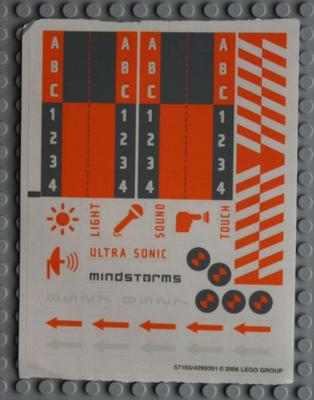
I, for one, could have used some labels. A little sheet of stickers, say, like the ones that come with Mindstorms:


We're persistent, and haven't given up on MOSS yet. But I had hoped that this would be a snap-and-go robotics toy for my kids, or something I could put out on a table at my homeschool group for kids to easily experiment with. Those hopes are pretty well dashed.

I still love the underlying concept, and I hope the ModRobotics team, or someone else, can keep working toward a robotics kit that's easier to dive into than Mindstorms. In the meantime, we still love Mindstorms. I paid almost four hundred bucks for this extensive kit of MOSS modules. I could have upgraded the Lego Savant to Mindstorms EV3 for $350, and taken him out for a nice dinner with the leftovers, and it's feeling like that would probably have been a better investment.

We may yet fall in love with MOSS, figuring out how to get our robots to hold together, or finding the sweet spot of things that MOSS is especially good for. But even if we do, a product that has "easy to use" as one of its main selling points should not have this kind of learning curve.

The Lego Savant says, "Yeah, I don't have anything to add except the arm thing. This is a pretty good review. I do plan to keep experimenting with it."

We'll update after we've played more, and let you know how things work out.

Thursday, January 6, 2011

Lego WeDo review

So, Eric likes to make Lego Mindstorms robots. And Carl, who is 6, enjoys noodling around with them, too, but it's a little over his head. So, for Christmas, I got him a Lego WeDo robotics set. We finally got it out to mess around with yesterday (our computer was out of commission for over a week because of a hard drive failure, but we're up and running and measuring our storage in terabytes now, so it's all good).  And we are thrilled with it.

WeDo comes with software; a collection of bricks, motors, and sensors in a reusable storage bin; and a big notebook full of information and instructions. There is also a set of four booklets, each with building instructions for three robots. I remember when we first got Mindstorms, how overwhelmed I felt--I just didn't know how to get started. WeDo, on the other hand, is made for schools, and I joked on Facebook yesterday that they're written like the subtext is, "Dear Elementary School Teacher, we realize it's possible that you just found out that in one hour you have to teach robotics to 27 second-graders, so we're going to make this easy on you." There are simple instructions and handy flowcharts about what to do first and what to do next. I love it.

The WeDo robots are powered by the computer's USB port, so they're always tethered; you're not going to be building a self-playing chess set or a robot that climbs a tree out of this thing. The building style is traditional brick based, so the things you make have that angular old-skool Lego look. (As opposed to Mindstorms, which uses a girder-and-connector style based on Lego Technics. I realize this will be technical blah blah for most of you. But I read a blog post about it recently and am trying to sound like I know more than I do.) But the things you build--two little birds that spin and dance, a sailboat that is tossed on a stormy sea, a clapping monkey--are very cute.

The programming interface is very bright and simple. WeDo has an icon-based graphical programming interface like Mindstorms, but much simplified (GeekDad has a screenshot here). Carl found it very easy to understand and use: you lay down a "start" block, then you can add blocks that run the motor, that play sounds, that act as a timer, and so on. You can have more than one program laid out on the screen at a time, and when you run a program, the block that is running lights up so you can easily connect what the robot is doing to what's in the program.

With Mindstorms, you have to write the program, compile it and download it to the robot's brick, and run it. If it doesn't work, you're back to the computer. It can make the de-bugging stage a bit lengthy. The WeDo interface makes trial-and-error quick and easy; you can write a program, run it, change it, find a bug, fix it, try something else, write a new program, and run it, all in about two minutes.

The trade-off, of course, is that the robots are very limited. You get a USB hub (kind of a little power brick), a motor, a tilt sensor, and a motion sensor. The designers have done a lot with a handful of gears and pulleys, but this is more like a tasty appetizer than a full robotics meal. With Mindstorms, there are a great many idea books, blogs, and websites, but not so with WeDo; at least not that I've found yet. I don't think it's leaked out of the schools market much. I'll be interested to see what Carl does when he's worked through the Activity Pack robots.

The WeDo activities are clearly designed to get kids thinking about how the gears, pulleys, and levers are operating. The interface for each activity starts with a short animated movie about the robot you're going to build, and then, before the building instructions, will say something like, "Our robot uses a motor to turn a small gear. The small gear turns a large gear, which operates a lever." I read it to Carl and he listens politely, but he really wants to get to the part where he can program the funny noises.

I paid an extra $50 or so for the Activity Pack, which has both building and programming instructions for a dozen projects, so the whole schmoo cost about $180, which is pricey (it's actually sold together as a "homeschool" pack now). I agree with some quibbles in GeekDad's review: if the computer didn't have dual monitors, I don't know how I'd have gotten out of the full-screen programming interface, and I still haven't quite figured out how saving programs and re-opening them works. The notebook could use a Quick Reference section; there was no easy way for me to look up how to save a program, for instance.

Still, I feel like we got our money's worth, and Carl has declared it the best Christmas present he ever got. The robots are simple to build and putting together programs is a snap. GeekDad says that you should consider whether you have younger relatives to hand it down to when deciding about the investment, and I admit I have already found myself wondering who among my homeschool pals might like to borrow it when Carl's done.

This is the second time  I've bought something from Lego Education, and I've been pleased both times (the first time I got a set of Simple Machines activity kits), not least because of the little plastic bins everything comes in. Sometimes I browse the Lego Education catalog and think I could build my kids' whole curriculum out of it.